Skip to content
HEALTHTECH

AIDA

Dental clinic management software: patient records, appointments, consent, stock, laboratory, implant tracking and accounting; data stays on the clinic’s computer.

The whole clinic day on one screen

AIDA is desktop management software built for dental practices and clinics. Patient records and tooth chart, appointments with WhatsApp reminders, signed digital consent, stock, laboratory jobs, implant documentation, receipts and accounting live in one application. The database stays on the clinic’s own computer; there is no cloud subscription.

Version 1.0 is available for macOS; a Windows build is provided on request. The screenshots on this page were prepared with sample data and contain no real patient information.

Download

The seven-day trial starts by itself; no account is needed to install. Information, demos and presentations: Hakan Aydın, [email protected], +90 537 255 72 08.

AIDA 1.0 for macOS

Apple Silicon (M1–M4), macOS 11 or later. DMG file, 148 MB. Checksum (SHA-256): c90821e4…932008.

Download AIDA-1.0.0-arm64.dmg

For Windows

The Windows build is prepared on request; write to us and we send the installer by e-mail.

Request the Windows build

Trial terms

The trial starts on first launch and runs for seven days with all modules enabled. When it ends the app locks; your data is not deleted. For a licence, send us the machine ID shown in the app; the key arrives by e-mail and works only on that computer.
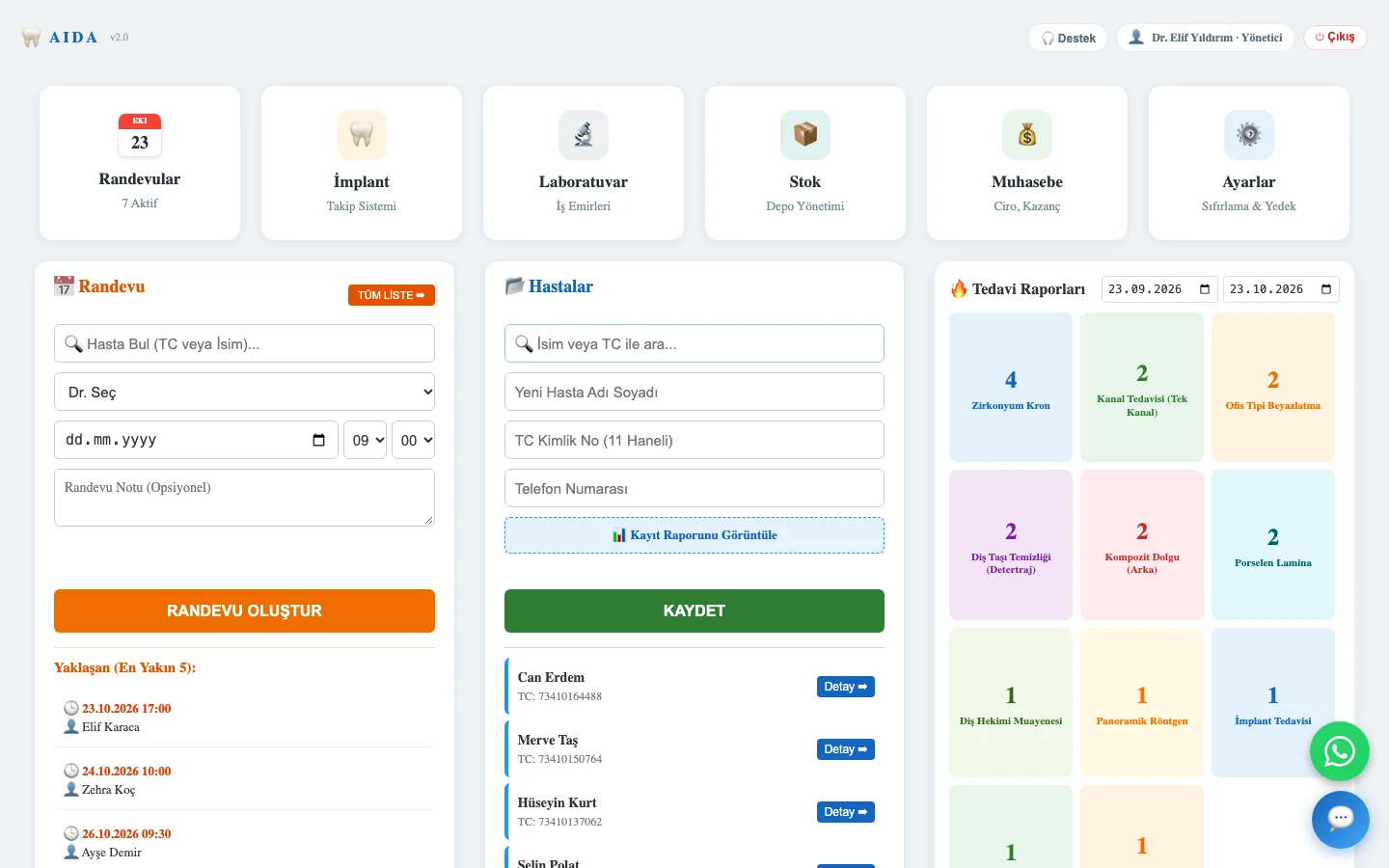
Main panel

Six modules and the day at a glance: upcoming appointments, quick appointment entry, patient search and treatment counts for a chosen date range. Permissions are separated by administrator and dentist roles.

  • Appointments, Implant tracking, Laboratory, Stock, Accounting, Settings
  • Next five appointments and a new appointment in one click
  • Patient search by name or national ID number
  • Treatment reports by date range
AIDA main panel: module cards, quick appointment, patient list and treatment reports

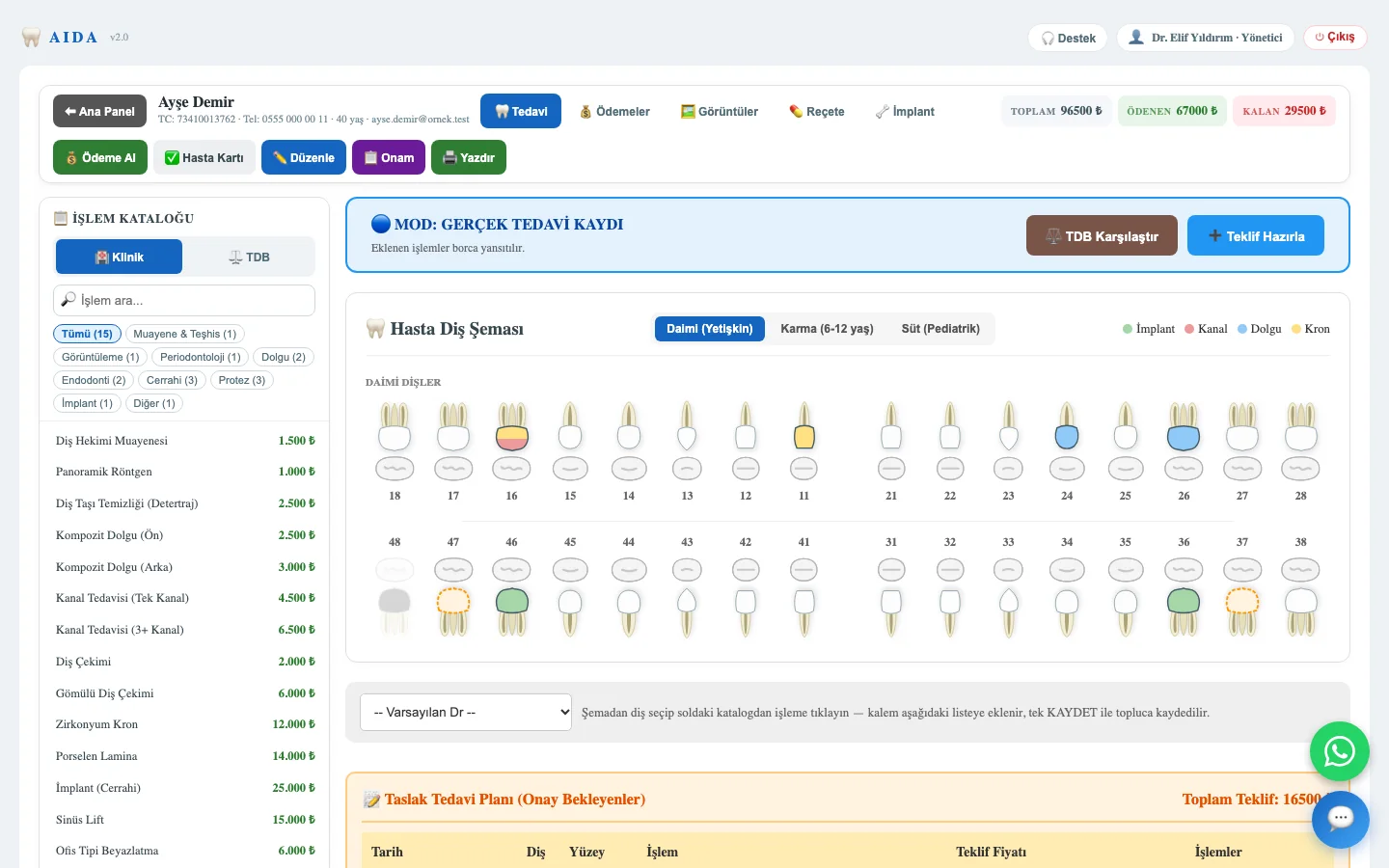
Patient card and tooth chart

The top strip shows total, paid and outstanding amounts next to the payment, patient card, consent and print buttons. The FDI tooth chart covers permanent, mixed and primary dentition; procedures are picked from the catalogue on the left and saved in one go.

  • Treatment, Payments, Images, Prescription and Implant tabs
  • The clinic’s own price list or the Turkish Dental Association tariff
  • Treatment plan versus completed treatment; proforma with tariff comparison
  • Anamnesis: 13 systemic conditions, allergies, medication, habits
AIDA patient card: balance strip, procedure catalogue and FDI tooth chart

Appointments and WhatsApp reminders

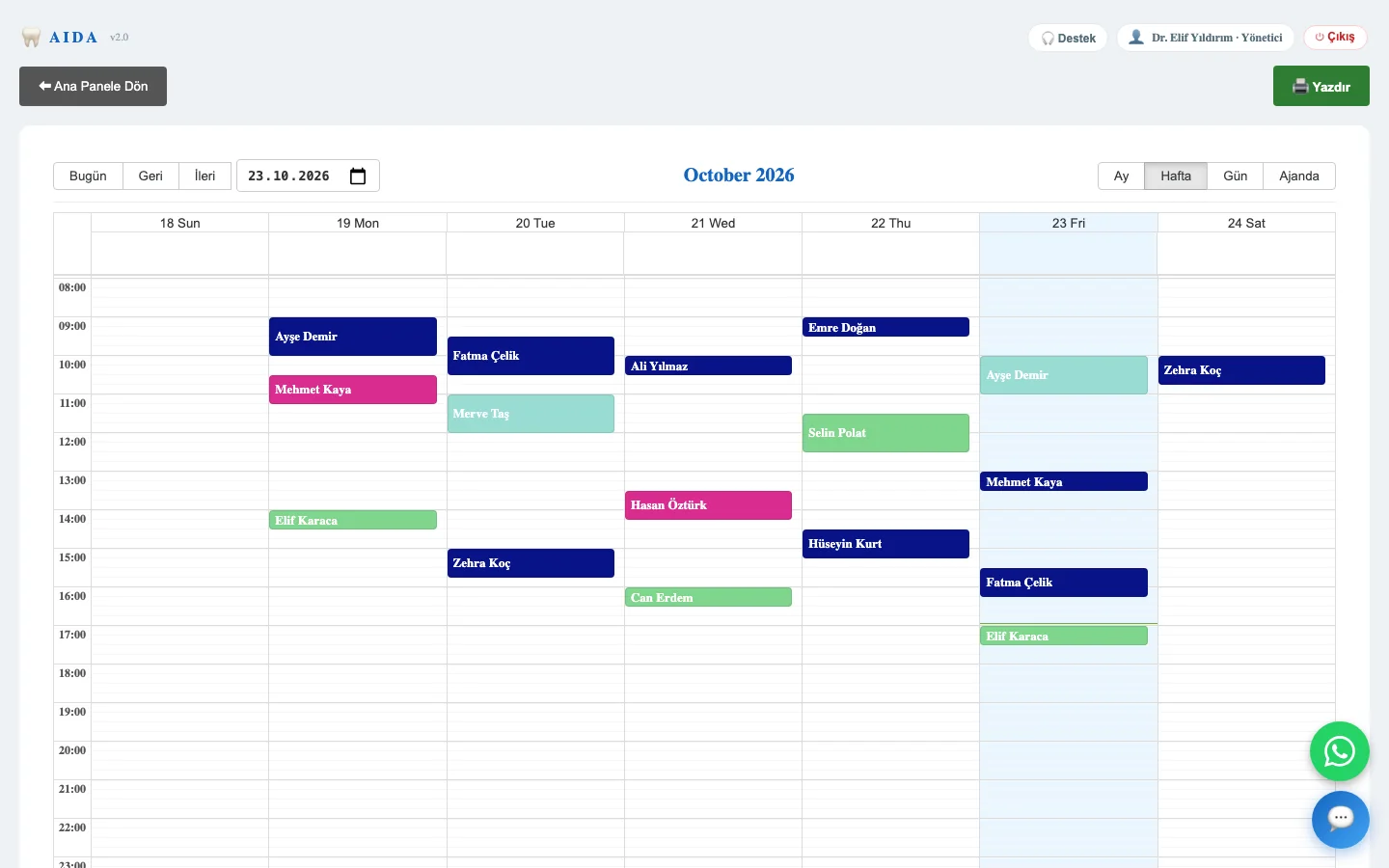
The calendar works in month, week, day and agenda views; overlapping appointments for the same dentist are blocked. Patients receive an automatic WhatsApp reminder 24 hours and 1 hour before the visit. The WhatsApp assistant answers incoming messages, proposes free slots and hands over to staff when needed; it never quotes prices.

  • Week view colour-coded per dentist
  • Automatic reminders with retry for undelivered messages
  • WhatsApp is connected from inside the app by scanning a QR code
AIDA appointment calendar in week view with appointments coloured by dentist

Digital consent

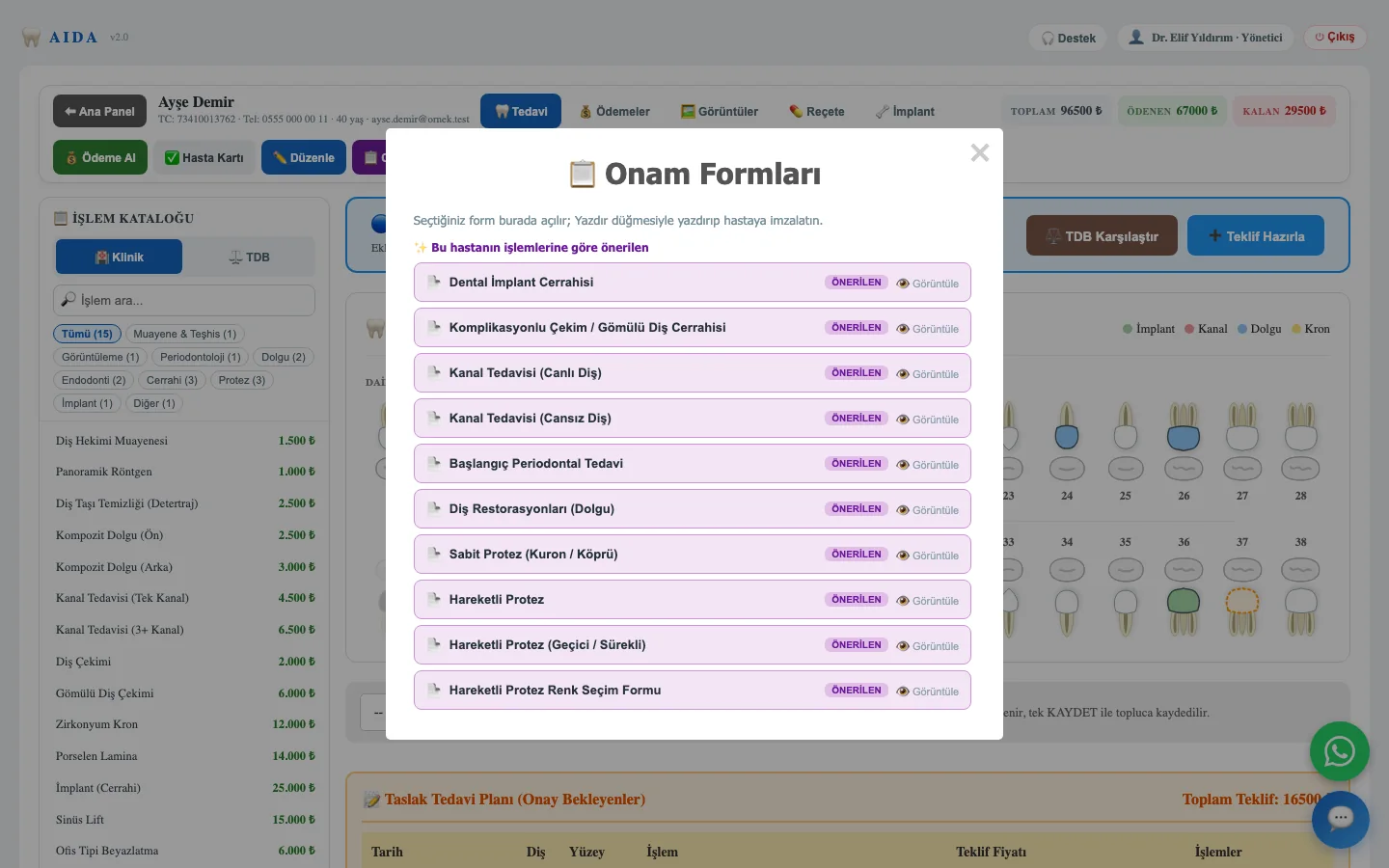
The general information and consent form is signed on screen when the patient card is saved. Twenty-two procedure-specific consent forms wait in the catalogue and are suggested according to the patient’s procedures. Permissions for messaging, AI processing, insurance and research are collected separately.

  • Signature by finger or mouse on screen
  • Surgery, endodontics, prosthetics, orthodontics, paediatric dentistry and more
  • Research permission comes only from the signed consent
AIDA consent form catalogue with forms suggested from the patient’s procedures

Implant documentation

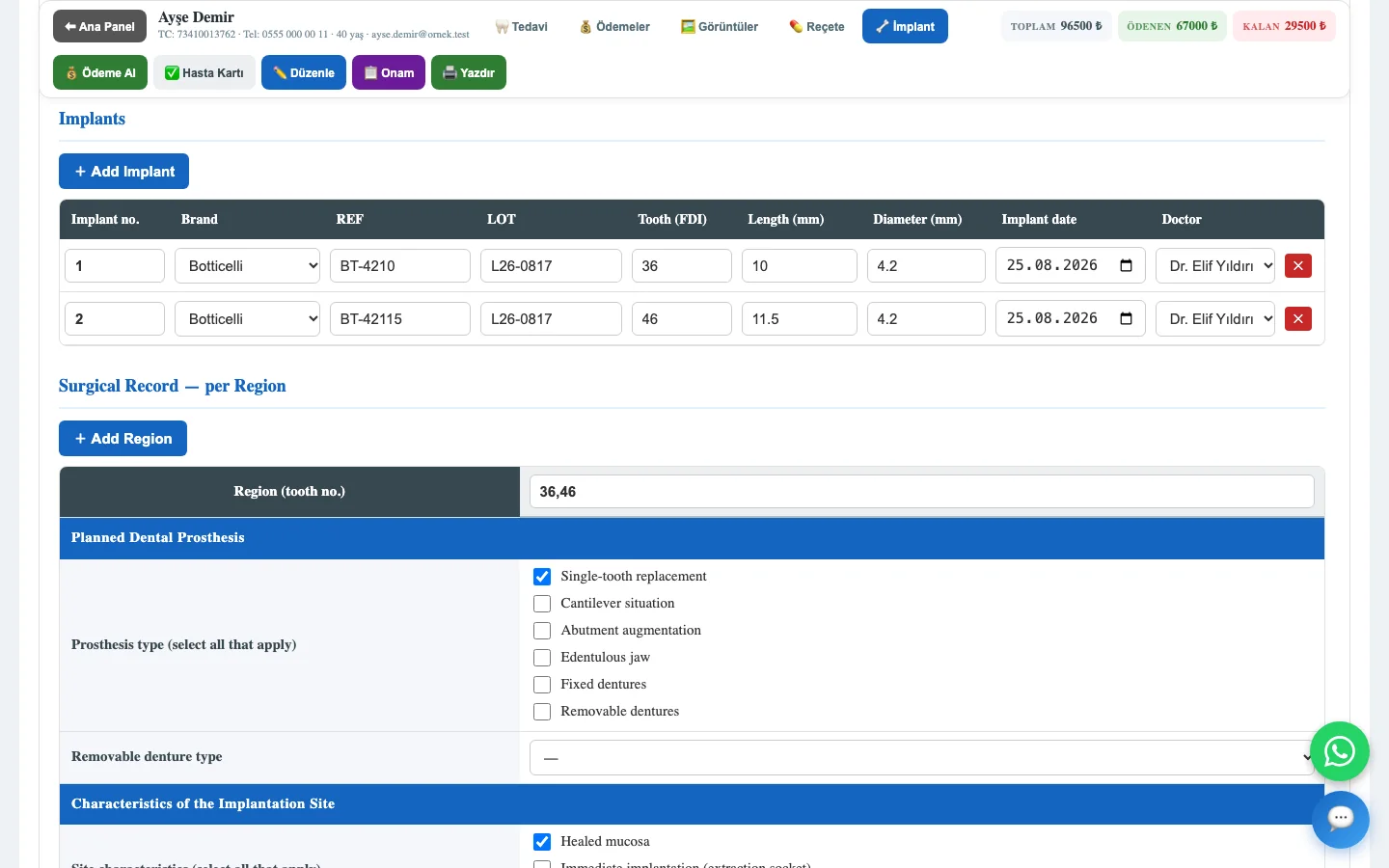
One form per implant patient: risk factors, pre-operative imaging, implant rows, the surgical record per region and the follow-up visits at one week, eight weeks and eighteen months. Stock is deducted automatically when an implant is placed, and a reminder is set for the restorative stage.

  • Brand, REF, LOT, FDI tooth number, length, diameter, date, surgeon
  • Bone quality, augmentation, stability, loading time
  • Follow-up of complications, mobility, osseointegration and satisfaction
AIDA implant documentation form: implant rows and surgical record

PMCF export

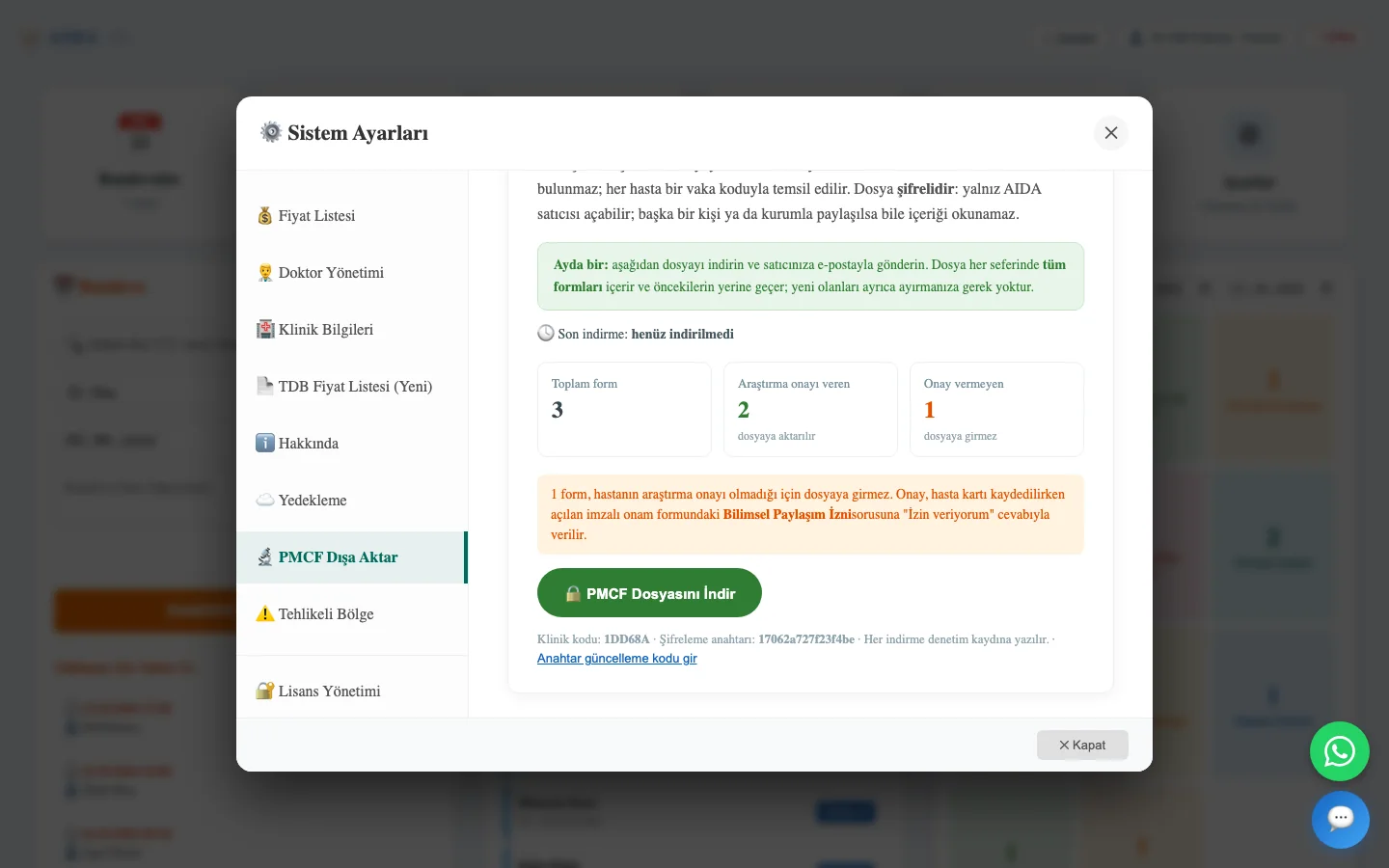
Once a month, the implant forms of patients who gave research consent are exported as a single encrypted file. The file contains no name, ID number, phone or address; each patient is represented by a case code. Only Medex can open the file, and every download is written to the audit log. Medex CRO turns the data into the manufacturer’s post-market clinical follow-up file.

  • Consenting and non-consenting patients are counted separately
  • Public-key encryption; nobody, not even the clinic, can read the content
  • Pseudonymised data: initials, age and sex remain
AIDA settings with the PMCF export panel: form counts and the encrypted download button

More screens

Stock, laboratory and accounting live in the same application.

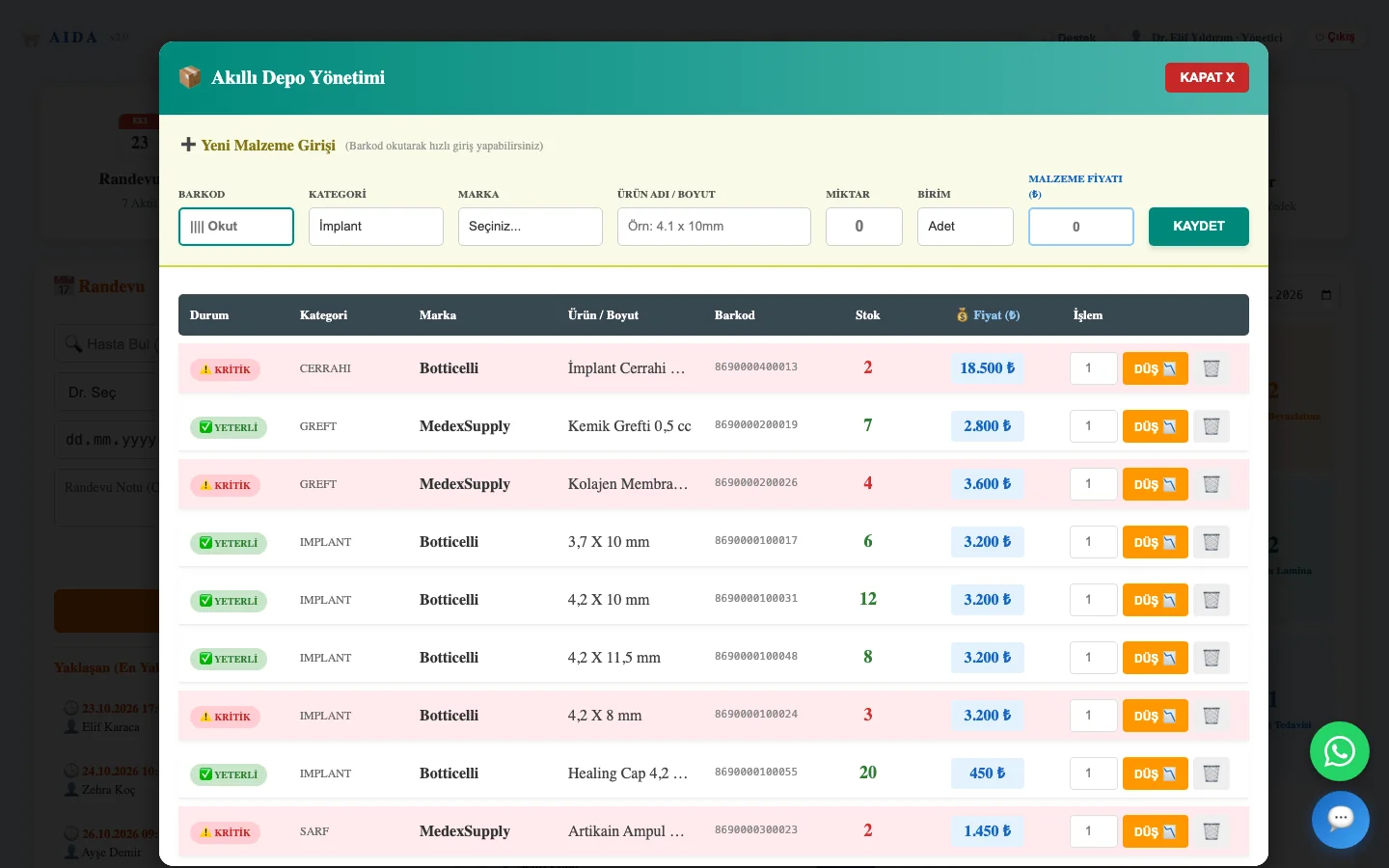
  • AIDA stock panel: barcode entry and critical-level alerts

    Stock: barcode entry, unit or box, critical-level alert; implant, graft, surgical set and consumable categories.

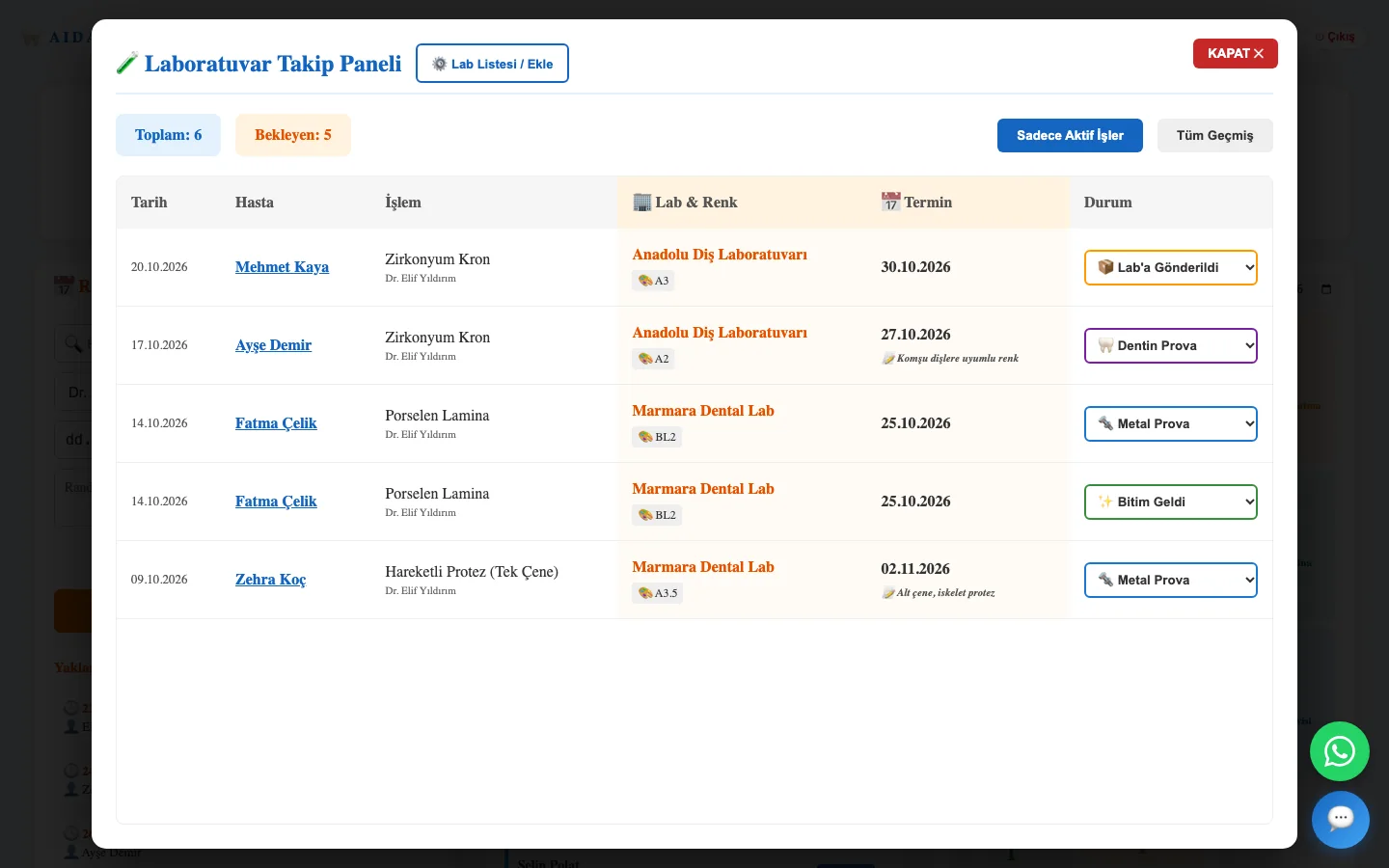
  • AIDA laboratory tracking panel: job stages and due dates

    Laboratory: six-stage job tracking, shade, due date and fee; list of partner laboratories.

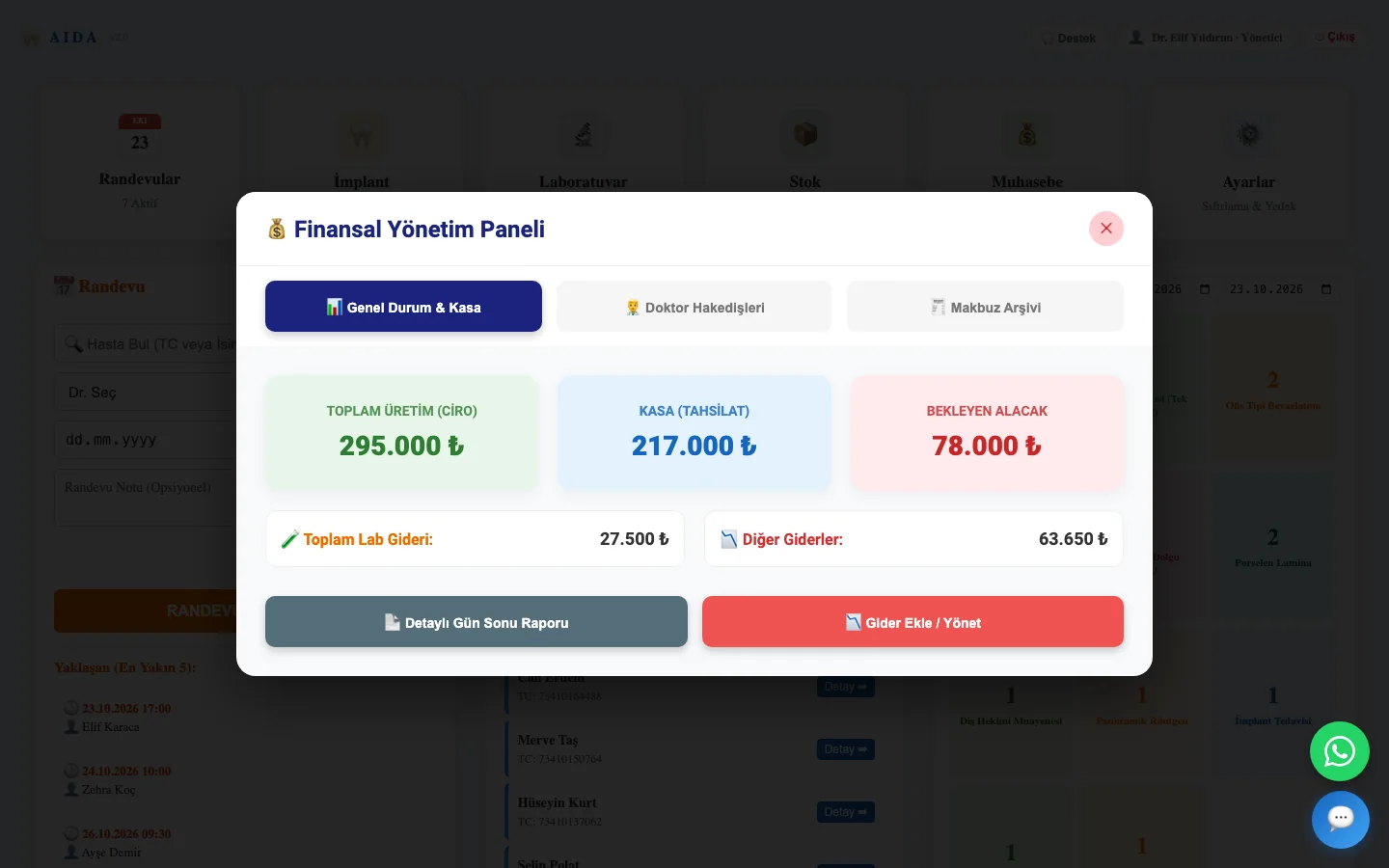
  • AIDA financial management panel: turnover, cash and outstanding receivables

    Accounting: turnover, cash, dentist commission, laboratory and other expenses; sequential receipt numbers and receipt archive.

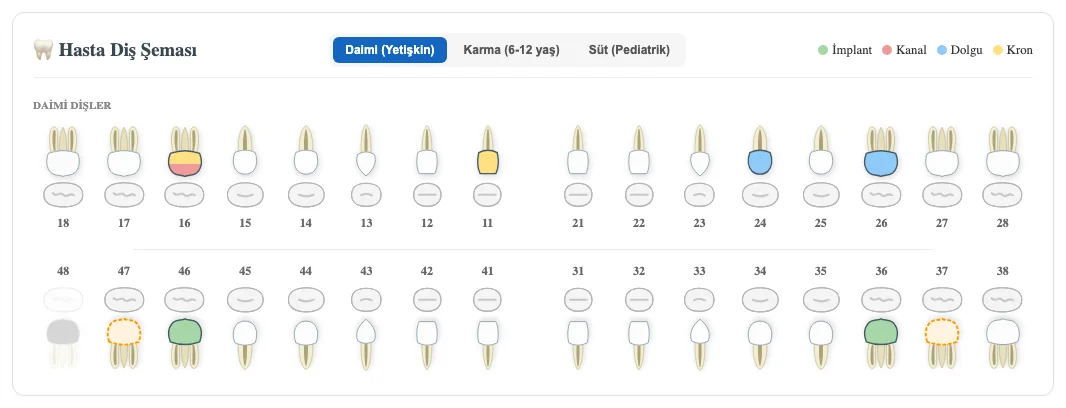
  • AIDA tooth chart close-up

    Tooth chart: implant, root canal, filling and crown layers; planned procedures shown with a dashed outline.

Technical details

Platform

macOS 11 or later on Apple Silicon (M1–M4). A Windows build is prepared on request.

Data

Local SQLite database in the user folder. Data survives updates and reinstalls. One-file backup and restore.

Internet

Needed only for WhatsApp, the AI assistant and e-mail. The AI assistant runs with the clinic’s own OpenAI key.

Licence

A seven-day trial starts automatically. The licence key is bound to the computer and verified offline.

First launch on macOS

The app has not yet been notarised by Apple, so macOS shows a security warning on first launch. Three steps get past it; it is not asked again.

  1. 1

    Dismiss the warning

    Open the DMG, drag AIDA to Applications and launch it. When macOS says “Apple could not verify AIDA is free of malware”, click Done.

  2. 2

    Open Anyway

    Open System Settings → Privacy & Security. Under Security, find “AIDA was blocked” and click Open Anyway, then enter your Mac password.

  3. 3

    Once is enough

    AIDA opens. The permission stays on the computer and is not requested again after updates.

These steps disappear once notarisation is complete. On macOS 13 and 14, right-click the app and choose Open.

Frequently asked questions

1Where is my data kept?

On the clinic’s computer, in a single database file in the user folder. There is no copy in the cloud. If you wish, a regular copy of the backup can be written to a synced folder.

2Does it work without internet?

Yes. Patient records, appointments, stock, laboratory, accounting and printing work offline. Internet is needed for WhatsApp reminders, the AI assistant and e-mail.

3Is there e-prescription or e-invoicing?

Not yet. Prescriptions are printed with the dentist’s diploma number; proforma and receipt printouts are available.

4Which implant brands are predefined?

Twenty brands are ready in stock and in the implant form; new brands can be added.

5What does it cost?

Licences are issued per clinic. Write to us for current terms and Medex Dental offers.

6How is it installed?

Download and open the application file; the administrator account is created inside the app on first launch. The licence key is sent by e-mail.

Try AIDA in your clinic

Write to us; we set it up together and the trial period starts by itself.

Talk to us